
 GitHub Actions Scheduled Code Execution - Daily Baidu Link Pushing
# GitHub Actions Scheduled Code Execution: Daily Baidu Link Pushing
My blog has been online for a while now, but I noticed that Baidu still hadn't indexed my blog pages. Among Baidu's push tools, in addition to auto-push code embedded in the website, there's also a more efficient real-time active push option.
I recently learned about GitHub Actions' scheduled code execution feature, which can be used to automatically run a command every day that generates all blog links and pushes them to Baidu in bulk.
GitHub Actions is a CI/CD (Continuous Integration/Continuous Deployment) tool, but it can also serve as a code execution environment. It's extremely powerful and can be used in many creative ways.
# Baidu Active Link Pushing
Active link pushing is described in Baidu Webmaster Tools, as shown below.
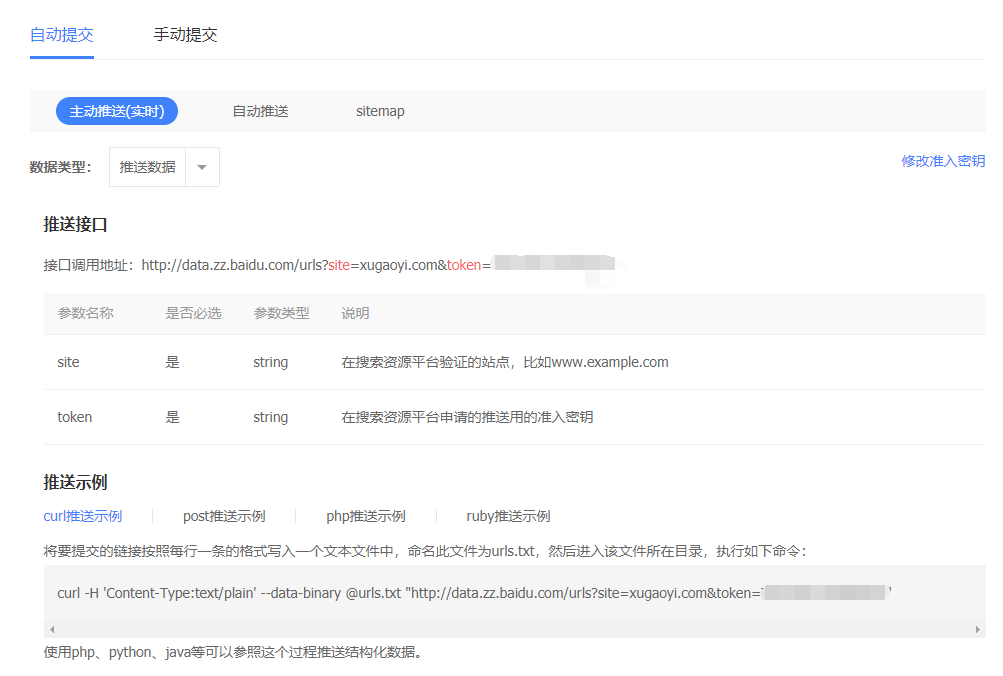
The specific method involves creating a urls.txt file with one link per line for all the links you want to submit, as shown below.
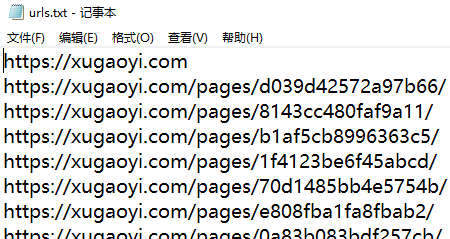
Run the command:
curl -H 'Content-Type:text/plain' --data-binary @urls.txt "http://data.zz.baidu.com/urls?site=xugaoyi.com&token=T5PEAzhG*****"
The URL and parameters in the command above are provided by Baidu Webmaster. After running, it returns the push results. If everything goes well, all links in urls.txt will be pushed to Baidu at once.
While this method is more efficient than the auto-push code embedded in website headers, it has its inconveniences: you have to manually enter links into the urls.txt file, then manually run the command.
# Automatically Generating urls.txt
No problem — the essence of technology is making people's lives easier. So I wrote a Node.js tool to generate all blog page links into urls.txt:
// baiduPush.js

/**
 * Generate Baidu link push file
 */
const fs = require('fs');
const path = require('path');
const logger = require('tracer').colorConsole();
const matter = require('gray-matter'); // FrontMatter parser https://github.com/jonschlinkert/gray-matter
const readFileList = require('./modules/readFileList');
const urlsRoot = path.join(__dirname, '..', 'urls.txt'); // Baidu link push file
const DOMAIN = process.argv.splice(2)[0]; // Get command line argument

if (!DOMAIN) {
  logger.error('Please specify a domain parameter for Baidu push when running this file, e.g.: node utils/baiduPush.js https://xugaoyi.com')
  return
}

main();
function main() {
  fs.writeFileSync(urlsRoot, DOMAIN)
  const files = readFileList(); // Read all md file data

  files.forEach( file => {
    const { data } = matter(fs.readFileSync(file.filePath, 'utf8'));

    if (data.permalink) {
      const link = `\r\n${DOMAIN}${data.permalink}/`;
      console.log(link)
      fs.appendFileSync(urlsRoot, link);
    }
  })
}
2
3
4
5
6
7
8
9
10
11
12
13
14
15
16
17
18
19
20
21
22
23
24
25
26
27
28
29
30
31
32
33
The code above is specifically designed for my blog to generate links into the urls.txt file. More code is available here (opens new window).
Running the following command generates a urls.txt file containing all blog links:
node utils/baiduPush.js https://xugaoyi.com
The first problem is solved 😏. Next, let's solve the second problem of having to manually run the push command.
If you can't auto-generate, you can also manually create a
urls.txtfile and put it in the GitHub repository.
# Scheduled Code Execution with GitHub Actions
Now for today's main feature: GitHub Actions. (Related: GitHub Actions Getting Started Tutorial (opens new window), Auto-Deploying a Static Blog with GitHub Actions (opens new window))
GitHub Actions is a CI/CD (Continuous Integration/Continuous Deployment) tool, but it can also serve as a code execution environment. It's extremely powerful and can be used in many creative ways.
# Configuring GitHub Actions
To trigger GitHub Actions, create a .github/workflows subdirectory in the project repository with YAML format (opens new window) configuration files. The filename can be anything. GitHub will run Actions whenever it finds a configuration file.
The first part of the configuration file is the trigger condition.
## baiduPush.yml
name: 'baiduPush'

on:
  push:
  schedule:
    - cron: '0 23 * * *'
2
3
4
5
6
7
In the code above, the name field describes the configuration file, and the on field specifies trigger conditions. We specify two triggers: the first is a code push to the repository, and the second is a scheduled task (opens new window) running daily at 23:00 UTC (which is 7:00 AM Beijing time, UTC+8).
See here (opens new window) for schedule configuration
Next comes the workflow.
jobs:
  bot:
    runs-on: ubuntu-latest # Run on the latest Ubuntu environment
    steps:
      - name: 'Checkout codes' # Step 1: Get repository code
        uses: actions/checkout@v1
      - name: 'Run baiduPush.sh' # Step 2: Execute shell script
        run: npm install && npm run baiduPush # Run commands (note: the working directory is the repository root)
2
3
4
5
6
7
8
In the code above, the run environment is the latest Ubuntu. Step 1 gets the code from the repository, and step 2 runs two commands: first installing project dependencies, then running the baiduPush command defined in package.json. Full code is here (opens new window).
# The baiduPush Command in package.json
// package.json
"scripts": {
	"baiduPush": "node utils/baiduPush.js https://xugaoyi.com && bash baiduPush.sh"
}
2
3
4
In the script above, add your domain parameter after node utils/baiduPush.js. Running this command generates the urls.txt file, then executes the baiduPush.sh file.
Note: When using a Windows system, please use the git bash command window to run the script above.
The
baiduPushcommand isn't placed inbaiduPush.yml's run because I also want to runnpm run baiduPushlocally.
# baiduPush.sh Executing the Baidu Push Command
baiduPush.sh file:
#!/usr/bin/env sh

set -e

# Baidu link push
curl -H 'Content-Type:text/plain' --data-binary @urls.txt "http://data.zz.baidu.com/urls?site=https://xugaoyi.com&token=T5PEAzhGa*****"

rm -rf urls.txt # Clean up
2
3
4
5
6
7
8
The code above pushes all links from the urls.txt file at once.
The command in baiduPush.sh isn't written in
package.jsonbecause I felt the command was too long and would be hard to read.
With the configuration in place and pushed to the repository, every day at 7:00 AM, a command will automatically run to generate a urls.txt file containing all blog page links, and push all links to Baidu at once. No more worrying about the site not being indexed! 😘 😘 😘
Building on this foundation, you can extend it to use GitHub Actions for all sorts of scheduled tasks.
# Related Articles
Auto-Deploying a Static Blog with GitHub Actions (opens new window)
Solving the Problem of Baidu Not Indexing Static Blogs Hosted on GitHub (opens new window)