
 Auto-Deploying a Static Blog with GitHub Actions
# Auto-Deploying a Static Blog with GitHub Actions
# Introduction
I built a static blog using VuePress and hosted it on GitHub Pages and Coding Pages (opens new window).
Coding Pages loads much faster in China than GitHub Pages, and it can also be indexed by Baidu.
Initially, I used a shell deployment script (opens new window) to push code to both platforms' repository branches. While already quite convenient, I also wanted to push the blog's unpackaged source code to the GitHub main branch. This required two separate operations, so I wondered if I could push the source code and deployment code to both platforms in a single operation.
# Implementation
After learning that GitHub Actions had just been officially released (December 2019), I tried it and found it met my needs. GitHub Actions Getting Started Tutorial (opens new window)
First, you need to obtain tokens, which will be used later. How to get them: GitHub token official docs (opens new window), Coding token official docs (opens new window).
Then, store both tokens in the GitHub repository's Settings/Secrets. Variable names can be anything, but they must match the variable names in the ci.yml file. Here they are named ACCESS_TOKEN and CODING_TOKEN.

GitHub Actions configuration files are called workflow files, stored in the .github/workflows directory of the code repository.
Workflow files use YAML format (opens new window). The filename can be anything, but the extension must be .yml, such as ci.yml. A repository can have multiple workflow files. GitHub will automatically run any .yml file it finds in the .github/workflows directory.
My ci.yml file:
name: CI

# Triggered on push events to the master branch.
on:
  push:
    branches:
      - master
jobs: # Workflow
  build:
    runs-on: ubuntu-latest # Runs on ubuntu-latest virtual environment

    strategy:
      matrix:
        node-version: [10.x]

    steps:
      - name: Checkout # Step 1
        uses: actions/checkout@v1 # Action used. Format: userName/repoName. Purpose: Check out the repository to get source code. Official actions library: https://github.com/actions
      - name: Use Node.js ${{ matrix.node-version }} # Step 2
        uses: actions/setup-node@v1 # Purpose: Install Node.js
        with:
          node-version: ${{ matrix.node-version }} # Version
      - name: run deploy.sh # Step 3 (Deploy to both GitHub and Coding simultaneously)
        env: # Set environment variables
          GITHUB_TOKEN: ${{ secrets.ACCESS_TOKEN }} # Token secret variable
          CODING_TOKEN: ${{ secrets.CODING_TOKEN }} # Tencent Cloud Developer Platform (Coding) secret token
        run: npm install && npm run deploy # Commands to execute
        # Add "deploy": "bash deploy.sh" to package.json
2
3
4
5
6
7
8
9
10
11
12
13
14
15
16
17
18
19
20
21
22
23
24
25
26
27
28
This configuration file triggers a workflow when I push code to the main branch. The runtime environment is ubuntu-latest. Workflow steps:
Step 1: Get the repository source code
Step 2: Install Node.js, needed for building the project
Step 3: Set tokens as environment variables, install project dependencies, and run the
deploy.shfile
ACCESS_TOKEN and CODING_TOKEN are secret variables stored in the GitHub repository's
Settings/Secrets. They can be accessed in repository code via <secrets.variable-name>, ensuring token privacy.
Now let's look at the deploy.sh deployment script that will be executed:
#!/usr/bin/env sh
# Abort on errors
set -e
npm run build # Generate static files
cd docs/.vuepress/dist # Enter the generated folder

# deploy to github
echo 'blog.xugaoyi.com' > CNAME
if [ -z "$GITHUB_TOKEN" ]; then
  msg='deploy'
  githubUrl=git@github.com:xugaoyi/blog.git
else
  msg='auto deploy from github actions'
  githubUrl=https://xugaoyi:${GITHUB_TOKEN}@github.com/xugaoyi/blog.git
  git config --global user.name "xugaoyi"
  git config --global user.email "894072666@qq.com"
fi
git init
git add -A
git commit -m "${msg}"
git push -f $githubUrl master:gh-pages # Push to GitHub

# deploy to coding
echo 'www.xugaoyi.com\nxugaoyi.com' > CNAME  # Custom domain
if [ -z "$CODING_TOKEN" ]; then  # -z returns true if the string length is 0; $CODING_TOKEN comes from the GitHub repository's `Settings/Secrets`
  codingUrl=git@git.dev.tencent.com:xugaoyi/xugaoyi.git
else
  codingUrl=https://xugaoyi:${CODING_TOKEN}@git.dev.tencent.com/xugaoyi/xugaoyi.git
fi
git add -A
git commit -m "${msg}"
git push -f $codingUrl master # Push to Coding

cd -
rm -rf docs/.vuepress/dist
2
3
4
5
6
7
8
9
10
11
12
13
14
15
16
17
18
19
20
21
22
23
24
25
26
27
28
29
30
31
32
33
34
35
This file is written using Shell commands (opens new window). It first runs the build command, enters the built files directory, creates a CNAME file for a custom domain (remove this if you don't have a custom domain), checks if there's a token environment variable — if not, it means deployment is running locally using SSH repository addresses; if yes, it means GitHub Actions triggered the deployment automatically using token-authenticated push addresses. Finally, git commands push to the respective repositories, completing the deployment.
Tips:
Shell can access environment variables.
I wanted different custom domains for the two platforms, so I created separate CNAME files and pushed separately.
With this setup, the need I mentioned earlier is fulfilled. I only need to push source code to the GitHub repository — the blog building, deployment to GitHub and Coding, and other tasks are all handled automatically by GitHub Actions.
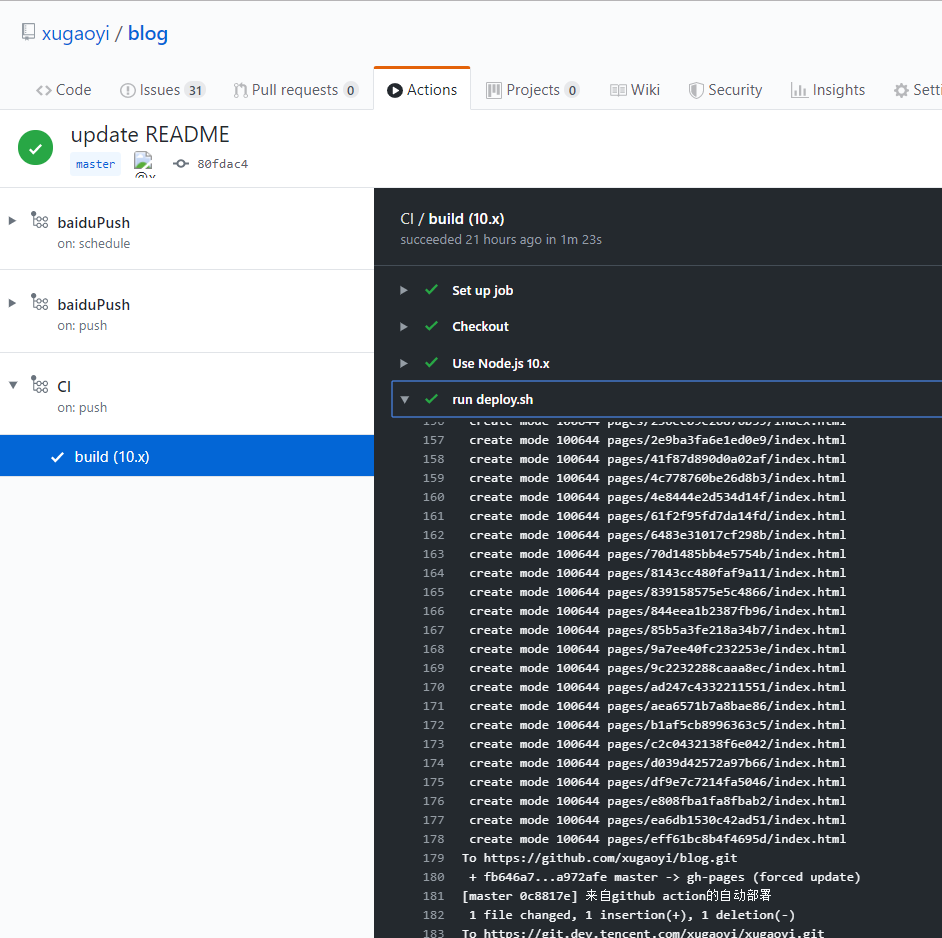
To view deployment logs, go to the Actions tab in your GitHub repository.
# Related Articles
GitHub Actions: Scheduled Code Execution for Daily Baidu Link Pushing (opens new window)