
 Git Branching Workflows
# Git Branching Workflows
Documentation: Git Branching Workflows (opens new window)
# Long-Running Branches
Because Git uses a simple three-way merge, merging one branch into another repeatedly over a long period is not a difficult task. This means you can have multiple open branches at different stages of the development cycle, and you can regularly merge some topic branches into other branches.
Many developers who use Git prefer this approach. For example, keep only fully stable code on the master branch, develop on the dev branch, merge into the test branch for testing once development is complete, and only merge thoroughly tested stable code into the master branch.
The dev and test branches don't need to be absolutely stable, but once test passes testing and reaches a stable state, it can be merged into master.
What we discussed is essentially pointers that shift to the right as you commit. The stable branch (master) pointer always lags far behind in the commit history, while the cutting-edge branch (dev or test) pointers tend to be further ahead.
You can use this approach to maintain different levels of stability. Some large projects also have a proposed or pu: proposed updates branch that may contain immature content not ready for the master branch. The purpose is to give your branches different levels of stability; when they reach a certain level of stability, they get merged into a branch with a higher stability level. Again, using multiple long-running branches is not required, but it is often helpful, especially when working on a very large or complex project.
# Topic Branches (Short-Lived Branches)
Topic branches are useful for projects of any size. A topic branch is a short-lived branch that is used to implement a single feature or related work.
You've already seen this in the previous section with the iss53 and hotfix topic branches. You made several commits in those topic branches and deleted them after merging into the main branch. This technique allows you to quickly and completely context-switch -- because your work is separated into different pipelines where each branch only relates to its target feature, making it much easier to see what changes were made during code review. You can keep changes in a topic branch for minutes, days, or even months, and merge them when ready, regardless of the order they were created or the progress of work.
Consider this example: you are working on master up to C1, then create iss91 to fix a problem, work on it up to C4, then have a new idea for the problem and create iss91v2 to try a different approach, go back to master and work for a while, then create dumbidea at C10 to experiment with an uncertain idea. Your commit history would look like this:
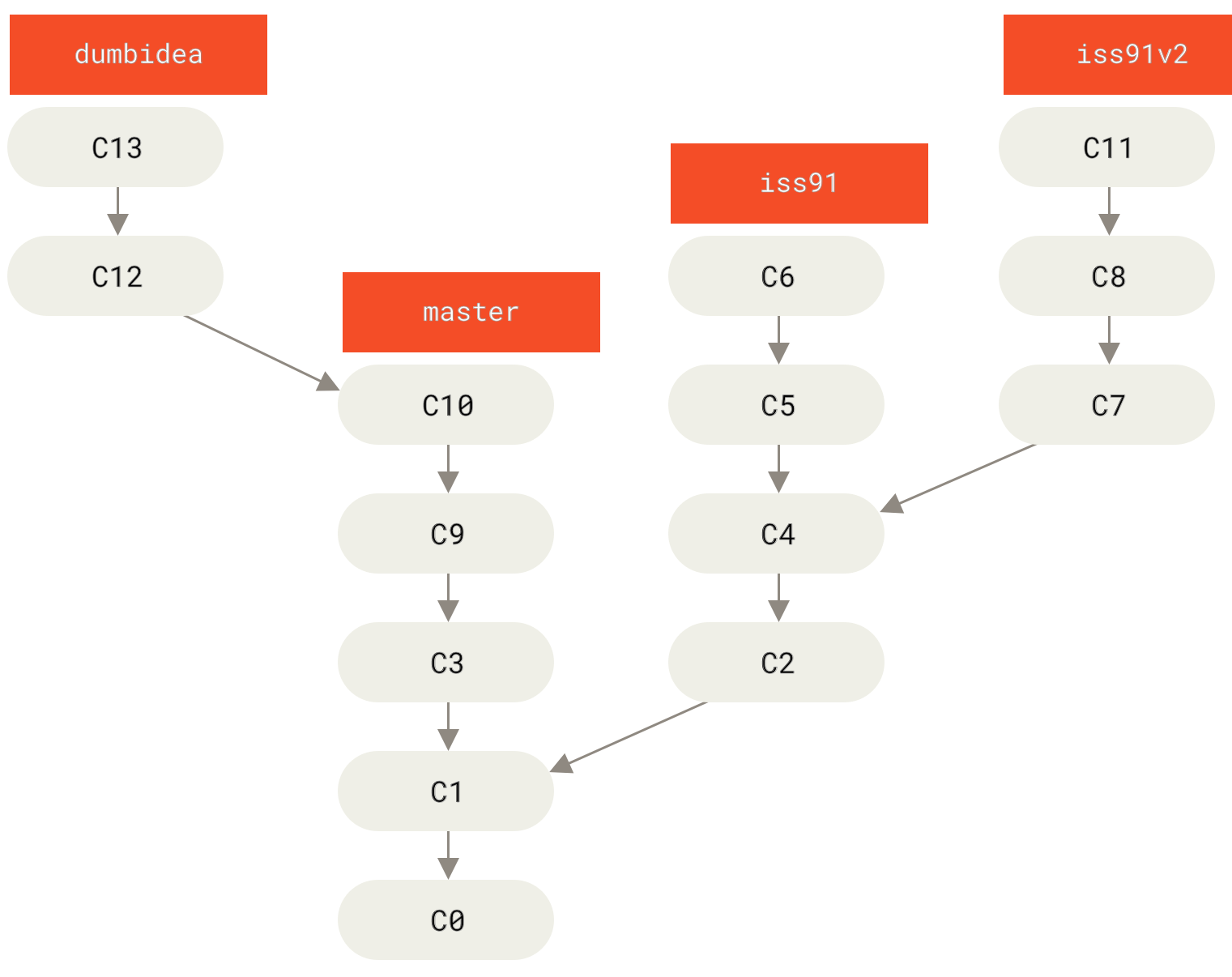
Figure 1. Commit history with multiple topic branches
Now, suppose two things: you decide to use the second approach (the iss91v2 branch) to solve the problem, and your colleagues think the dumbidea branch is brilliant. You can discard the iss91 branch (dropping commits C5 and C6) and merge the other two branches into the main branch. The final commit history would look like this:
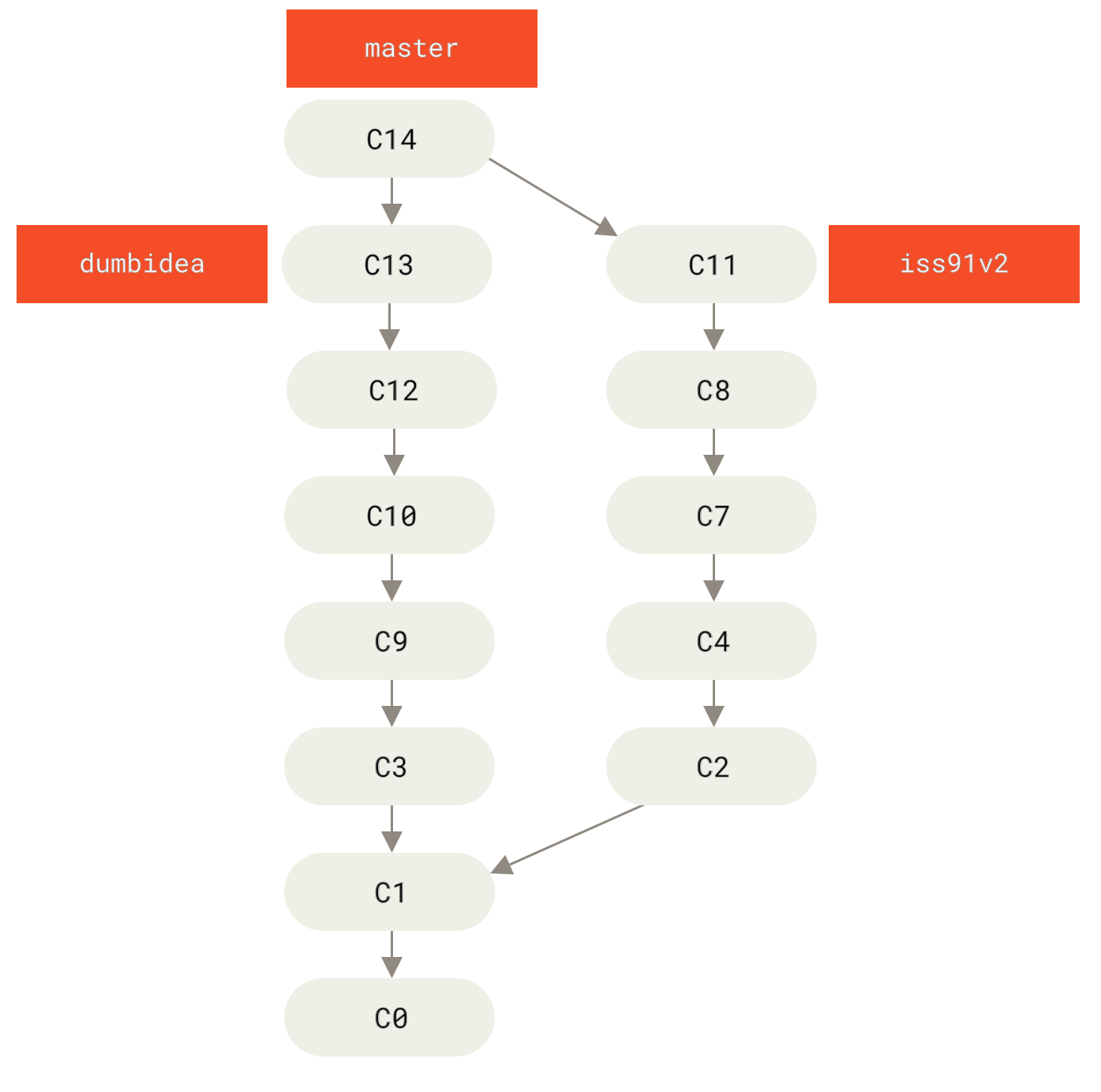
Figure 2. Commit history after merging dumbidea and iss91v2
We will reveal more about branching workflows in Distributed Git (opens new window), so make sure you read that chapter before deciding what branching scheme to use for your next project.
Remember that when you are doing all of this, these branches are entirely local. When you create and merge branches, everything happens only in your local Git repository -- no server communication occurs.