
 Implementing a Serverless Comment System for Static Blogs with Gitalk
# Implementing a Serverless Comment System for Static Blogs with Gitalk
# Introduction
Gitalk is a comment plugin based on GitHub Issues and Preact.
Let's use it to add a comment section to a blog built with VuePress.
# Prerequisites
Before using something new, you should first understand it.
Gitalk demo: https://gitalk.github.io/ (opens new window)
Gitalk GitHub: https://github.com/gitalk/gitalk (opens new window)
# Implementation
How to implement it? The best approach, in my opinion, is to read the official documentation (opens new window). Here I'm just documenting the implementation steps.
We'll use an existing vuepress-plugin-comment (opens new window) plugin to help integrate Gitalk into our VuePress static blog.
# Installation
npm install --save vuepress-plugin-comment
# Usage
The options configuration is the same as Gitalk's configuration.
module.exports = {
  plugins: [
    [
      'vuepress-plugin-comment',
      {
        choosen: 'gitalk',
        options: {
          clientID: 'GitHub Application Client ID',
          clientSecret: 'GitHub Application Client Secret',
          repo: 'GitHub repo',
          owner: 'GitHub repo owner',
          admin: ['GitHub repo owner and collaborators, only these guys can initialize github issues'],
          distractionFreeMode: false
        }
      }
    ]
  ]
}
2
3
4
5
6
7
8
9
10
11
12
13
14
15
16
17
18
You need a GitHub Application. If you don't have one, click here to create one (opens new window). Set the Authorization callback URL to the domain of the page using this plugin.
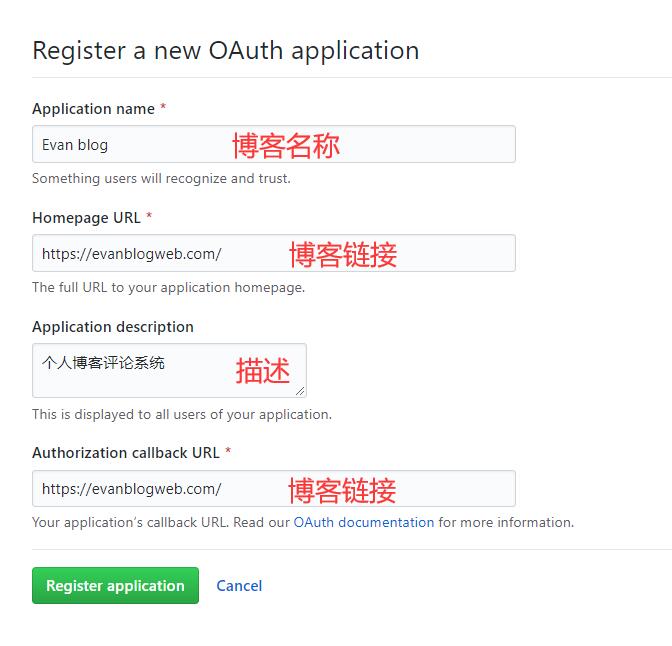
After completing the registration, you'll receive a Client ID and Client Secret. Then fill in the corresponding parameters in the configuration, for example:
module.exports = {
  plugins: [
    [
      'vuepress-plugin-comment',
      {
        choosen: 'gitalk',
        options: {
          clientID: 'a6e*******4709b88b',
          clientSecret: 'f0e***************beb8b2d54d7241',
          repo: 'blog', // GitHub repository
          owner: 'xugaoyi', // GitHub repository owner
          admin: ['xugaoyi'], // Users with write access to the repository
          distractionFreeMode: false
        }
      }
    ]
  ]
}
2
3
4
5
6
7
8
9
10
11
12
13
14
15
16
17
18
After configuring and restarting the project, you'll see a comment section on the page, indicating the comment feature is working! But there are still some bugs to fix. Let's keep improving it.
# Bug Fixes
Comment section style doesn't match the blog
Solution: Create a global style file .vuepress/styles/index.styl and add the following styles:
#vuepress-plugin-comment
  max-width $contentWidth
  margin 0 auto
  padding 2rem 2.5rem
  @media (max-width: $MQNarrow)
    padding 2rem
  @media (max-width: $MQMobileNarrow)
    padding 1.5rem
2
3
4
5
6
7
8
Comment section shows Error: Validation Failed.
Problem analysis: When the page URL is too long or contains Chinese characters, the entire URL string exceeds 50 characters, causing the Issues API request to fail with a 422 status code. (Chinese URLs are automatically encoded and become very long; the id parameter defaults to the URL and cannot exceed 50 characters.)
Solution: Manually set the id value and limit its length to 50 characters.
{
 choosen: 'gitalk',
 options: {
   ...
   id: "<%- (window.location.origin + (frontmatter.to.path || window.location.pathname)).slice(-50) %>", //  Unique page identifier, length cannot exceed 50
   title: "Comment: <%- document.title %>", // GitHub issue title
   labels: ["Gitalk", "Comment"], // GitHub issue labels
   body:"<%- document.title %>: <%- window.location.origin + (frontmatter.to.path || window.location.pathname) %>" // GitHub issue body
 }
}
2
3
4
5
6
7
8
9
10
When accessing variables like
$frontmatterorwindow, use EJS syntax. Callback functions can't be used in the configuration as they get filtered by VuePress, so EJS syntax is used instead. -- Plugin author's documentation note
After switching pages, the comment section still shows comments from the previous page
Solution: When getting the path for the id, use frontmatter.to.path. The plugin has built-in frontmatter.from and frontmatter.to.
{
 choosen: 'gitalk',
 options: {
   ...
   id: "<%- (window.location.origin + (frontmatter.to.path || window.location.pathname)).slice(-50) %>", //  Unique page identifier, length cannot exceed 50
   title: "Comment: <%- document.title %>", // GitHub issue title
   labels: ["Gitalk", "Comment"], // GitHub issue labels
   body:"<%- document.title %>: <%- window.location.origin + (frontmatter.to.path || window.location.pathname) %>" // GitHub issue body
 }
}
2
3
4
5
6
7
8
9
10